Get Support
Home
EnvyTheme
Milian – Theme Documentation
Cookie Notice
Getting Started
Welcome to Milian
Milian Download Options & Files
EnvyTheme Support System
Installation and Update
Theme Requirements & WordPress Setup
Theme Installation & Setup
Setup Child Theme
Theme Updates
Page & Post
Create a New Page
Create a New Post
Build Your Site
WordPress Configuration
Customizer
Theme Configuration
Theme Options
Menu
Footer
Widgets and Sidebars
Contact Forms
Tips / Guides / Troubleshoots
How to Fix “Page Not Found” 404 Error in Elementor?
Language Translations
Fix 500 Internal Server Error
How to Use Custom Fonts
How to Speed Up Your WordPress Website
Get MailChimp Newsletter Form Action URL
How to Build Header With Elementor?
Theme License Q&A
Light and Dark Version Setup
Cookie Notice
Cookie Notice
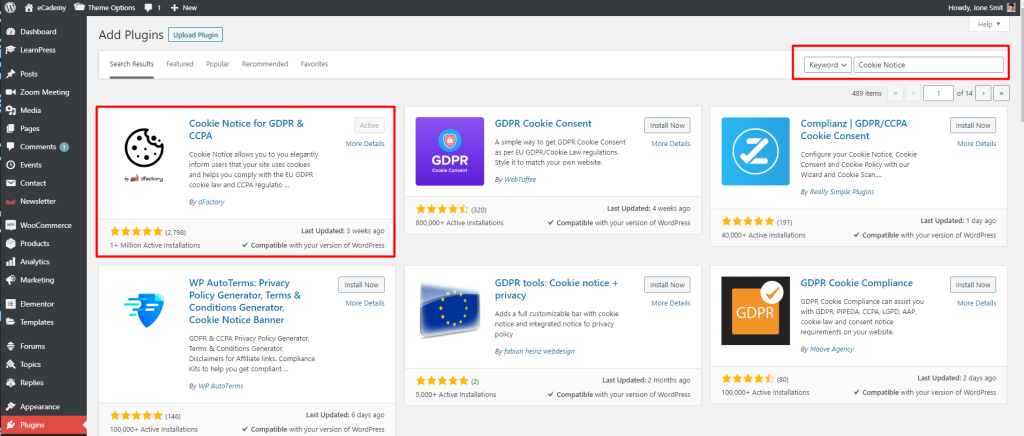
Step 1
1
. Go to Plugins>Add New search for “
Cookie Notice
” and then install and activate.
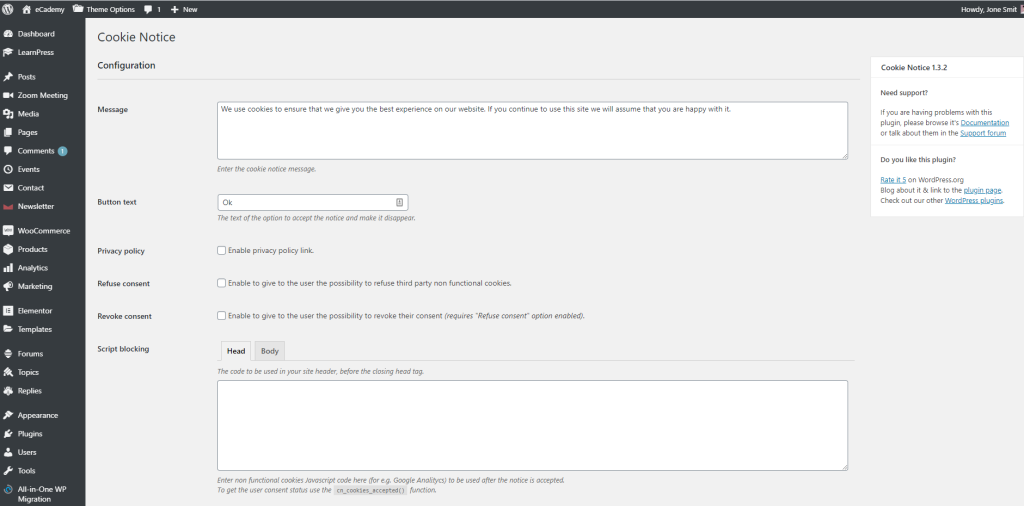
Step 2
Visit ‘Settings->Cookie Notice’
and do the essential configuration as you want
How can we help you?
Cancel
Send