Get Support
Home
EnvyTheme
Ellen – Theme Documentation
Theme Configuration
Build Header With Elementor
Getting Started
Welcome to Ellen
Ellen Download Options & Files
EnvyTheme Support System
Installation and Update
Theme Requirements & WordPress Setup
Theme Installation & Setup
Setup Child Theme
Theme Updates
Build Your Site
WordPress Configuration
Customizer
Theme Configuration
Theme Options
Menu
Footer
Build Header With Elementor
Widgets and Sidebars
LearnPress Settings
Tutor LMS Settings
Contact Forms
Page & Post
Create a New Page
Create a New Post
LearnPress
Content Drip
Create a Certificate for Students
Grading System
Membership
Video Tutorials
Theme Installation
Theme Updates
Tips / Guides / Troubleshoots
Theme License Q&A
How does the FAQ widget work?
How to Register an Instructor
Live Stream your Lesson
How to Setup Login/Register Page?
How to Fix “Page Not Found” 404 Error in Elementor?
How to Build Header With Elementor?
Get MailChimp Newsletter Form Action URL
How to Speed Up Your WordPress Website
How to Use Custom Fonts
Language Translations
Fix 500 Internal Server Error
Build Header With Elementor
Steps to Create a Custom Header:
Navigate to
Headers > Add New
from your WordPress dashboard to create a new Header template.
Under
Page Attributes
, select the
Elementor Canvas
template, then click the
Publish
button.
After publishing, click the
“Edit with Elementor”
button to start editing the header with Elementor.
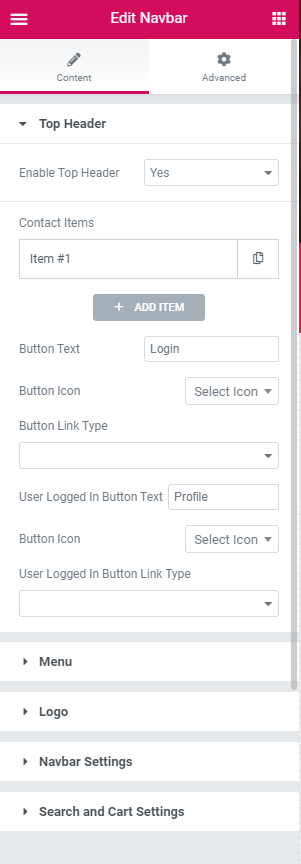
In the Elementor widget search field, search for
“Navbar”
to find the
Header Menu Bar / Navigation Bar
widget. Drag and drop it into your design.
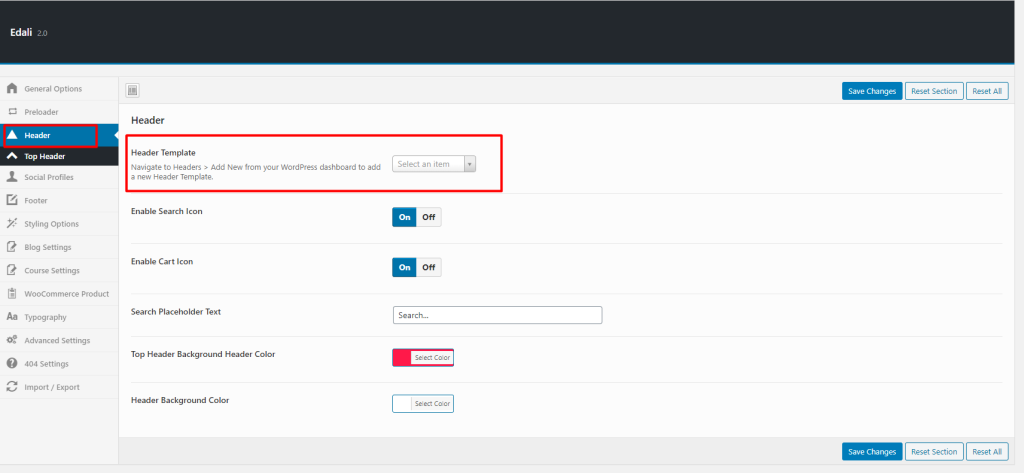
4. Navigate to
Theme Options> Header
to choose your custom made header template.
How can we help you?
Cancel
Send