
Before starting this please have a look at this requirements link and make sure, then go to the below.
If you decided to use the Static version of Spet then please jump to 2.
spet-gatsby-static/spet folder and open a terminal/bash/command on that folder and run these commands one by one
npm installnpm run developFolder Structure
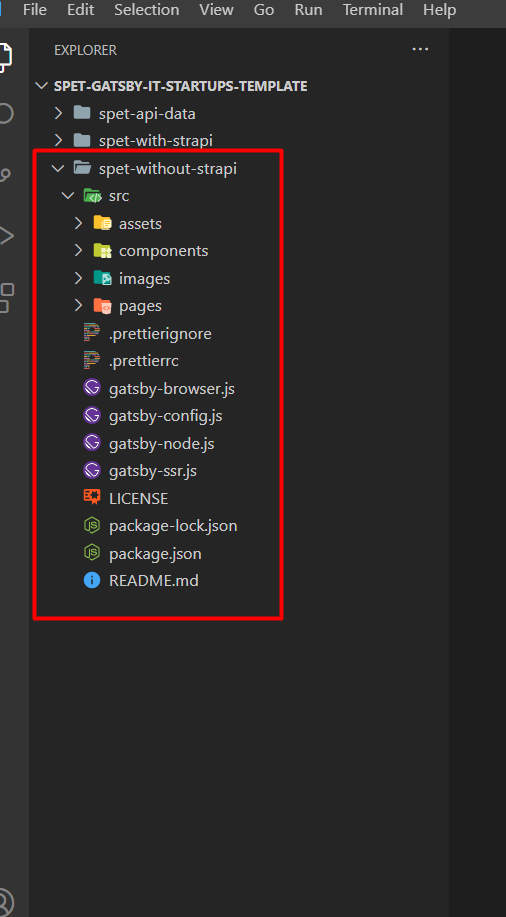
1. Open the spet-gatsby-strapi/spet-api and update the config/plugin.js file as the cloudinary credentials.
2. Open the pgAdmin server & create a database name spet-api and restore the spet-api-data from the downloaded bundle.
3. Open the config/database.js and update your PostgreSQL credentials & database name.
4. Run the command npm install
5. Run the command npm run develop
6. Go To localhost:1337
7. Login by the credential Email: [email protected] Password: EnvyTheme1
8. Done
spet-gatsby-strapi/spet and follow the like below by opening another command prompt in this folder.
npm installnpm run develophttp://localhost:8000/Still confused? Don’t worry! Check the referenced installation and configuration Video Tutorial below
Here is Video Tutorial, we have done the exact same thing for other Strapi projects, just follow the concepts.