Get Support
Home
EnvyTheme
Vaximo – Theme Documentation
FAQs
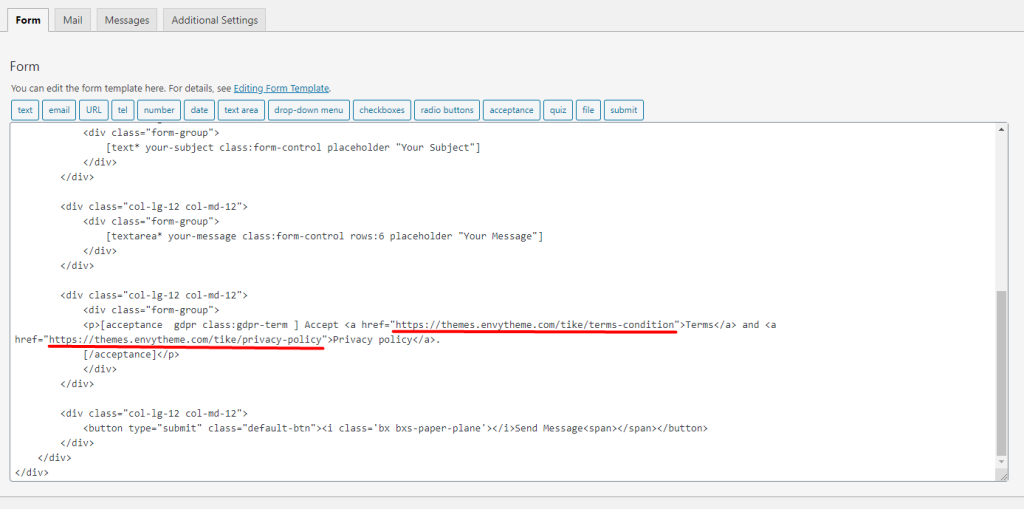
How To Change GDPR Text & Link?
Getting Started
Welcome to Vaximo
Vaximo Download Options & Files
EnvyTheme Support System
Installation and Update
Theme Requirements & WordPress Setup
Theme Installation & Setup
Setup Child Theme
Theme Updates
Page & Post
Create a New Page
Create a New Post
Theme Configuration
Theme Options
Menu
Footer
Footer Contact Info
Widgets and Sidebars
Contact Forms
Box Icon Lists
Cookie Notice
How to create/edit a Services Post
Make Service Details Page with Elementor
Tips / Guides / Troubleshoots
Language Translations
Speed up your WordPress website with Vaximo
Not getting the new Elements / Sections
Missing Style Sheet Error When Installing the Theme
Get MailChimp Newsletter Form Action URL
How to Fix “Page Not Found” 404 Error in Elementor?
Fix 500 Internal Server Error
How to Use Custom Fonts
How to Build Header With Elementor?
Theme License Q&A
FAQs
How to Change Theme Color?
How to Change Logo?
How To Change GDPR Text & Link?
How to Hide Pages Banner?
How to Change Coming Soon Time Counter
How to Upload Site Favicon?
Why black and white logo?
How To Change GDPR Text & Link?
Hit
Contact
>
Edit
. From here you can set your link.
How can we help you?
Cancel
Send